The Print Data Dictionary Definition utility allows you to generate output in a standard format that lists all of the elements in the definitions that have been selected for printing.
Invoke this utility by selecting Utilities > Print from the Data Dictionary Maintenance menu bar.
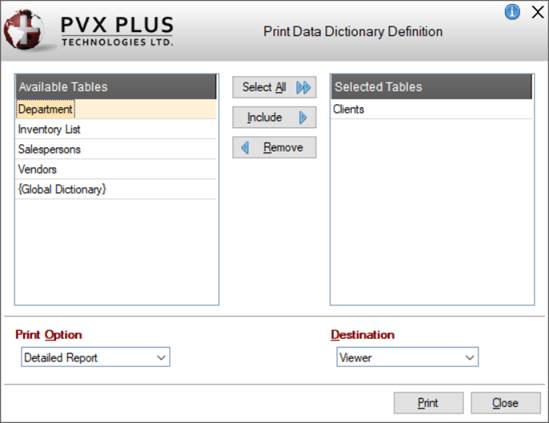
This utility consists of the following:
Available Tables | Lists definitions (tables) in the current data dictionary that are available for printing. |
Selected Tables | Lists the tables that have been selected for printing. Use the Select All, Include and Remove buttons to add or remove selected items. |
Select All | Button used to move all definitions (tables) from the Available Tables list to the Selected Tables list. |
Include | Button used to move only the selected definition (table) from the Available Tables list to the Selected Tables list. |
Remove | Button used to move only the selected definition (table) from the Selected Tables list to the Available Tables list. |
Print Option | Click the drop-down arrow to select either Detailed Report or Summary Report. Default is Detailed Report. |
Destination | Click the drop-down arrow to select a printing destination: Viewer, PDF or Printer. Default is the PxPlus Report Viewer. If you select an alternate destination, that destination will become the default for that session (or until you select a different destination). |
Outputs the report to the selected destination. | |
Close | Exits the Print Data Dictionary Definition utility. |