PxPlus 2026 Update 1 (version 23.10), November 2026
PxPlus 2026 Update 1 is an update release that includes the enhancements below and a number of small fixes that have been implemented since the PxPlus 2026 (version 23.00) release.
Enhancements
Language Changes
Added new Timeout argument to the *BROWSER object's ExecJS method
Enhanced the DROP..ON directive to accept drag-and-drop of email attachments or other virtual sources
Added the FIN keyword TrueGuiFont to return the true Windows GUI font, including face, size and attributes, as reported by the operating system
Modernized the PxPlus Message Box to use TrueGuiFont, rounded buttons and updated colors
Added a FlatFolder property to the Folder object that creates non-sidebar Folder controls and tabs with a flat appearance (no 3D look)
Product Activation Key Screen Changes
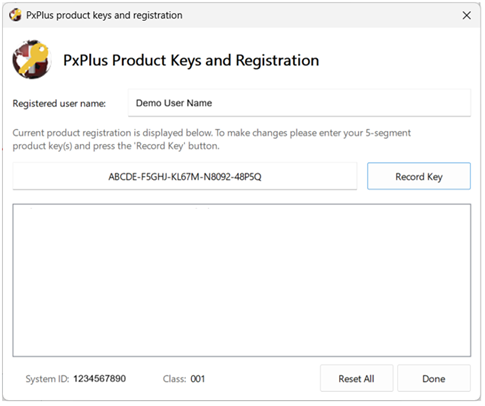
Modernized the look of the Product Activation Key screen (Windows)
Simplified Activation Key entry by replacing the five segment fields with a single auto-formatted field with dashes, making it easier to edit, delete, or copy/paste a key
Streamlined the layout by widening the screen and placing System ID and Class on the same line
Rounded buttons and input fields, and increased input field height
Updated background, focus, and hover colors to standard Windows colors
Changed the font and improved text readability
Webster+ Security
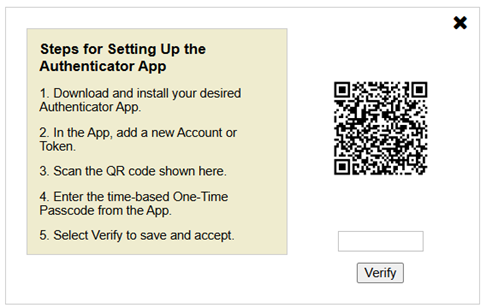
Added Authenticator App verification to Two-Factor Authentication
Enhanced IDE, Nomads and Toolkit
Folder property added
Flat Folder: Creates non-sidebar Folder controls and tabs with a flat appearance (no 3D look)
Applied the new FlatFolder property to the HTML folder and tabs in the expanded IDE
Added a Description column to the Record Details grid in the Library Bulk Edit and Search utility to identify variables in the Field column
*IT - Integrated Toolkit
Enhanced the GoTo functionality to remember the last statement entered or selected, independently for each program opened
Themes and Visual Classes
Folder property added
Flat Folder: Creates non-sidebar Folder controls and tabs with a flat appearance (no 3D look)
WindX
Improved performance in several toolkit programs and utilities by implementing the 'TU' (WindX Turbo Mode) system parameter in strategic areas of the code
Improved WindX handling of Escape (Ctrl+Break) during NT or SSH connection startup so incomplete connections now close instead of entering internal PxPlus programs
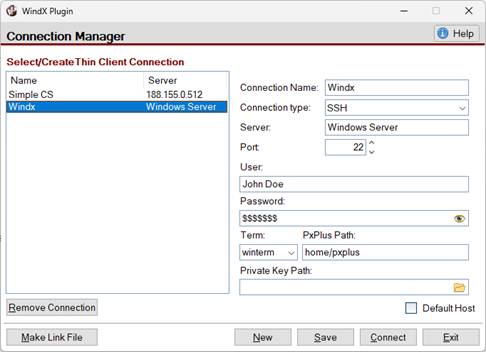
WindX Connection Manager enhancements
Ability to specify a Private Key Path to a PuTTY private key file (.ppk) for SSH authentication
Added a New button to clear the fields (except Connection type and Port) for the currently selected connection, making it easier to enter the settings for a new connection
Added a Remove Connection button as another way to delete saved connections
Added an optional -privateKey argument to the *SSH System Library utility for specifying the path to a PuTTY private key file
EZWeb Server
Added new configuration directives AllowEmptyHost and AllowEmptyUserAgent to allow web requests without a Host or User Agent header
[MYSQL] Open MySQL/MariaDB Database Link
Improved TLS connection option handling by detecting the loaded client's vendor and TLS backend at runtime and sending only the options that client supports
Added new OPT= Parameters to support SSL/TLS connections
SSLCA=path: CA certificate file used to verify the server certificate
SSLCAPATH=dir: Directory of CA certificate files used to verify the server certificate
SSLCERT=path: Client certificate file to present to the server
SSLCIPHER=list: Restricts the connection to the listed TLS ciphers
SSLENFORCE[=Y | N]: Set to Y to require an encrypted connection
SSLKEY=path: Client private key file corresponding to the client certificate
TLSPASSPHRASE=xxx: Passphrase for a passphrase-protected client private key
TLSVERSION=xxx: Restricts the connection to the listed TLS protocol version(s)
USECONFIG[=path]: Read connection settings from a client configuration file
Updated the SSLVERIFY[=Y | N] OPT= parameter to accept a Y or N value instead of always verifying
Added a new CHARSET OPT= parameter and [MySQL] INI setting to specify a connection character set
Now defaults to MariaDB client if both MySQL client and MariaDB client are found, since MariaDB is newer (newer versions of MySQL are not supported)
JSON arrays now support the full Unicode character range, from U+0000 to U+10FFFF
CVS conversion from UTF-8 to Unicode now supports the full Unicode character range, from U+0000 to U+10FFFF
The PxPlus environment now supports the full Unicode character range, from U+0000 to U+10FFFF
New How To Tutorials
Two-Factor Authentication (2FA)
Report Writer
Rounded Corners on Controls
WindX Performance
Fixes and Minor Improvements
Resolved an issue that caused an invalid configuration entry in Data Mirroring on Linux
Corrected syntax highlighting when using the Visual Studio Code Extension
Improved extension setting descriptions for the Visual Studio Code Extension
Added error trapping to *plus/web/request so that errors are returned to the calling program
Improved SQL ODBC Driver/Server handling of WHERE clauses that reference high variable segment fields
Updated Linux *web/sftp username syntax for compatibility across command-line shells
Resolved an issue that caused HTTP requests to hang when connecting to a secure EZWeb Server
Fixed an issue that caused an incorrect icon to display on the Windows taskbar
Corrected a List Box display issue in iNomads
Resolved an issue that caused Data Mirroring to lose its connection when sending data from a Windows client to a Linux server
Corrected an Error 11 that could occur during a sequential read of a large keyed file after multiple removes and writes
Resolved a stability issue with spell-check enabled locked Multi_Line controls
Corrected handling of Check Box and Radio Button data classes with bitmaps when used in grid cells