PxPlus 2025 (version 22.00), May 2025
PxPlus 2025 includes new features for added security and introduces feature-rich enhancements to bring enhanced performance and flexibility to your applications:
 | Keeping up-to-date with the latest security protocols is crucial for protecting sensitive data and systems from evolving cyber threats. Outdated security measures can leave vulnerabilities that are easily exploited. PxPlus 2025 features the latest security modules, safeguarding your application and your customers' data. |
| Email providers have strengthened email security by replacing basic authentication with OAuth2 to reduce credential theft and unauthorized access. PxPlus 2025 now supports OAuth2 authorization in SMTP and Web Email utilities. |
| .NET offers a wealth of robust libraries. The new .NET Interface for PxPlus 2025 redefines what is possible with PxPlus, forging a powerful bridge to the .NET ecosystem and paving the way for the next generation of intelligent, adaptive applications. |
| JSON is a widely adopted standard for representing structured data and facilitating data interchange across systems. The new JSON object in PxPlus 2025 is extremely fast and introduces a richer set of features and methods, greatly simplifying the creation and manipulation of JSON data while significantly improving current JSON functionality. |
Major New Features
Updated PxPlus Security modules:
OpenSSL 3.5.0
Curl 8.13.0
Plink 0.83
Updated CA Root Certificates
Updated the version of Chromium (*Browser)
Updated PxPlus SQL ODBC Driver and PxPlus SQL Server (Version 8.10.0000) to use the latest OpenSSL 3.5.0
Added support for OAuth2 authorization to the SMTP and Web Email utilities to enforce stricter security
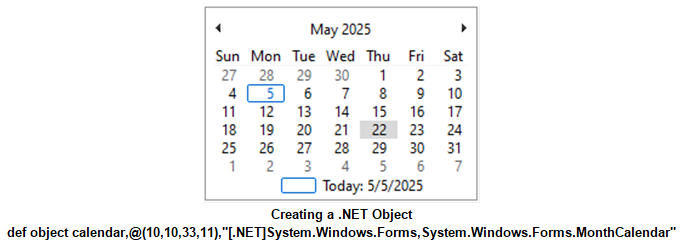
New .NET Interface facilitates the seamless integration of .NET objects into applications, ensuring the same level of usability and consistency as native PxPlus objects
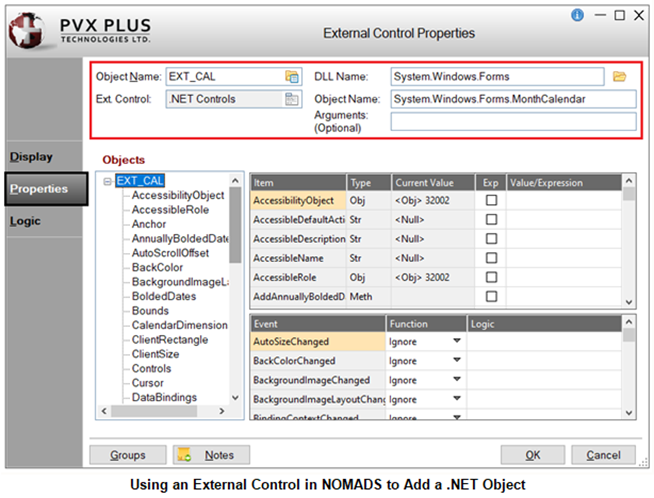
New .NET External Controls for embedding .NET objects into NOMADS panels
New JSON Object interface
Enhanced capability to convert JSON to XML and XML to JSON using updated objects
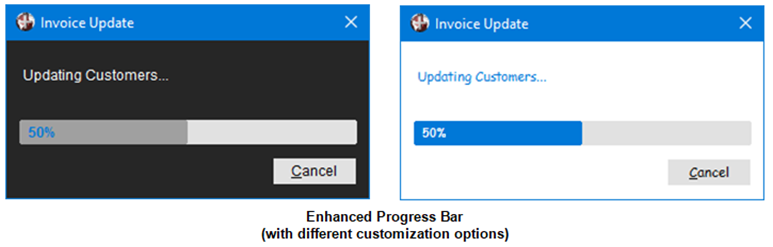
Visually enhanced Progress Bar with customizable styling options
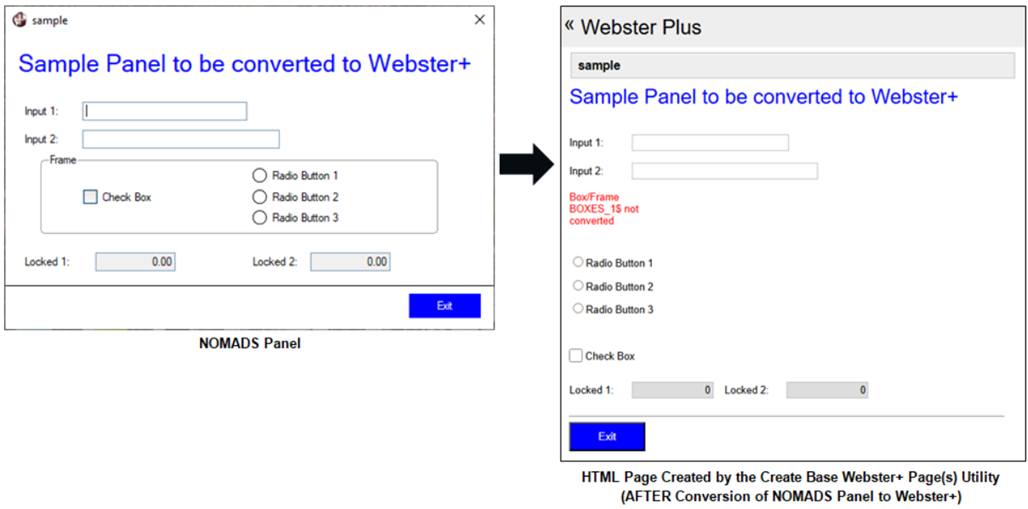
As part of our ongoing commitment to expand Web development activities, a new Create Base Webster+ Page(s) utility has been introduced to create base Webster+ HTML pages from NOMADS panels as a starting point
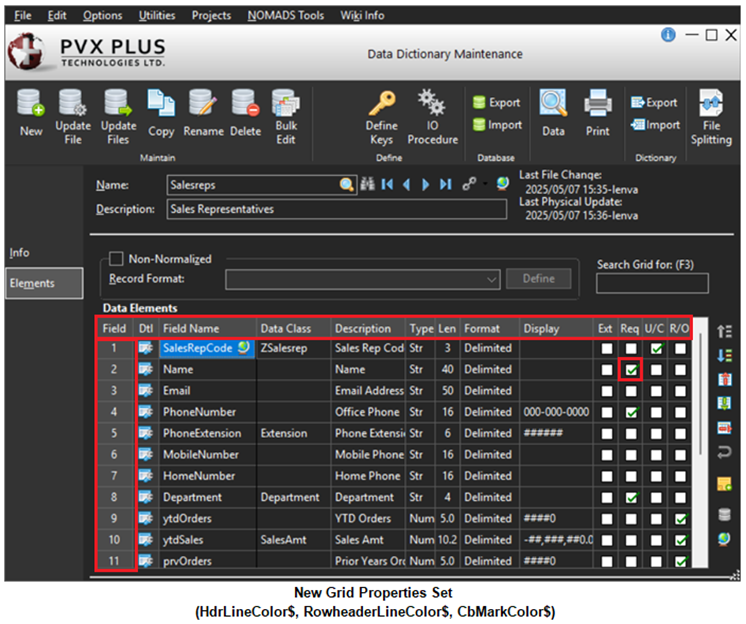
In keeping with our continued focus to modernize the PxPlus toolkit and your applications for both NOMADS and non-NOMADS, new control properties have been added for enhancing the user experience
We updated the PxPlus Visual Studio Code Extension (Version 1.0.1) to support running on UNIX/Linux platforms
WindX performance improvements
Enhancements
Language Changes
Updated the PxPlus build environment to the latest version (Visual Studio 2022) to take advantage of the latest compiler optimizations
Directives
Enhanced the DUMP DISABLE directive to accept a pattern string, providing greater control of the variables that can be excluded from the dump
.NET support added to the DEF OBJECT directive
Added the ability to pass Arguments to the DEF OBJECT directive for .NET objects
.NET support added to the ON EVENT directive
Properties
Properties can be used to specify settings for NOMADS and non-NOMADS applications.
Note: To use the new properties, 4D mode is required.
Check Box properties added
CbDisableFrameColor$: Sets the color of the disabled Check Box frame only for standard Check Boxes (with no bitmap added)
CbDisableMarkColor$: Sets the color of the check mark or X in the disabled Check Box only for standard Check Boxes (with no bitmap added)
Grid properties added
CbMarkColor$: Sets the color of the check mark or X in the Check Box
HdrLineColor$: Sets the color of the border lines drawn between columns when the 'ExcelStyle property is set for the top row only of the Grid (does not affect the leading left column)
LockButtonColor$: Sets the background color for locked system-generated buttons in a Grid, including Drop Box buttons and Query buttons
LockForegroundButtonColor$: Sets the foreground text color for locked system-generated buttons in a Grid, including Drop Box buttons and Query buttons
RowHeaderLineColor$: Sets the color of the border lines drawn between rows when the 'ExcelStyle property is set for the leading left column only of the Grid (does not affect the top row)
Radio Button properties added
RbDisableFrameColor$: Sets the color of the disabled Radio Button frame only for standard Radio Buttons (with no bitmap added)
RbDisableMarkColor$: Sets the color of the circle in the disabled Radio Button only for standard Radio Buttons (with no bitmap added)
Existing properties enhanced to support additional controls
ActiveBackColor$: Can now be used for standard Check Boxes and Radio Buttons (with no bitmap added)
DisableBackColor$: Can now be used for disabled standard Check Boxes and Radio Buttons (with no bitmap added)
HoverBackColor$, HoverBorderColor$, HoverTextColor$: These properties can now be used for standard Check Boxes and Radio Buttons (with no bitmap added), Drop Boxes, Variable Drop Boxes, Multi-Lines and RTF Multi-Lines
Objects
Array List Object now supports the ability to append and insert an array list to another array list
Added Microsoft Service type to the OAuth2 object
JSON and XML Objects
New JSON Object provides a faster, more structured and efficient way to handle JSON data than associative arrays, offering a richer set of functions and methods for manipulating JSON structures
New methods added to XML Object
Load_json: Sets the XML object using a JSON object
Load_xml_file: Loads the XML object from the data in the given XML file
Save_xml_file: Saves the XML data from the object to a file
Excel and Word Objects
Ability to instantiate the Excel Object or Word Object by passing a [RUNNING] or [RUNNING OR NEW] parameter
New methods added to Excel Object
AutoFitAll: Sets the AutoFit property for all columns and rows in a worksheet
AutoFitColumns: Sets the AutoFit property for the columns for a range of cells in a given worksheet
AutoFitRows: Sets the AutoFit property for the rows in a range of cells in a given worksheet
New methods added to Google Sheets Object
AutoFitAll: Auto resizes all column widths and row heights based on cell content in a sheet
AutoFitColumns: Auto resizes column widths based on cell content for a range of cells in a given sheet
AutoFitRows: Auto resizes row heights based on cell content for a range of cells in a given sheet
Webster+
Added the Create Base Webster+ Page(s) utility for creating base HTML pages from existing NOMADS panels as a starting point
Improvements to iNomads template used when displaying iNomads tasks in Webster+
Visual Studio Code Extension
Updated to use Version 1.0.1 to support running on UNIX/Linux platforms
Enhanced IDE, NOMADS and Toolkit
Updated fonts and properties for Dark and Light mode toolkit themes
Added new Tab Name options to the Tab Name drop box on the Maintain IDE HTML Tabs dialog
New Projects menu available with options for creating/editing projects and managing project tasks when NOMADS is run from the PxPlus Command Line (using the Nom command), similar to the PxPlus IDE
NOMADS+ Toolbar is now the default panel designer
Grid Presets: New properties added
CbMarkColor$: Sets the color of the check mark or X in the check box
HdrLineColor$: Sets the color of the border lines drawn between columns when the 'ExcelStyle property is set for the top row only of the grid and does not affect the leading left column
LockButtonColor$: Sets the background color for locked system-generated buttons in a grid, including drop box buttons and query buttons
LockForegroundButtonColor$: Sets the foreground text color for locked system-generated buttons in a grid, including drop box buttons and query buttons
RowHeaderLineColor$: Sets the color of the border lines drawn between rows when the 'ExcelStyle property is set for the leading left column only of the grid and does not affect the grid top row
Change Directory utility (in NOMADS Session Manager) now has a query button in the Directory field for selecting a directory or creating a new one
Updated the panel header and controls information that can be displayed when using the PxPlus Wiki
Renamed COM control in all screen designers to EXT External Control
.NET objects can now be added to a NOMADS panel using External Controls in all screen designers
File Maintenance Generator
Ability to create or edit the Interface Program and Grid Initialization Program by using the program editor when generating file maintenance HTML pages
Adding a Folder Location now automatically defaults to a Full row
iNomads
Added support for the Multi-Line Encrypt$ property
Themes and Visual Classes
New check box option added to Font Properties allows a specified font name to be used without overriding the font size and attribute settings for the library, panel or individual controls
Check Box properties added or modified
CB Disable Frame Color added: Sets the color of the disabled Check Box frame only for standard Check Boxes (with no bitmap added)
CB Disable Mark Color added: Sets the color of the check mark in the disabled Check Box only for standard Check Boxes (with no bitmap added)
Hover Background Color, Hover Border Color and Hover Text Color: These properties can now be used for standard Check Boxes (with no bitmap added)
Check Box Frame Color renamed to CB Frame Color
Check Box Hover Color renamed to CB Hover Color
Check Box Mark Color renamed to CB Mark Color
Drop Box properties added
Hover Background Color: Sets the background color when the mouse is over the control
Hover Border Color: Sets the border color when the mouse is over the control
Hover Text Color: Sets the foreground text color when the mouse is over the control
Grid properties added
CB Disable Mark Color: Sets the color of the check mark in the disabled Check Box
CB Mark Color: Sets the color of the check mark in the Check Box
Header Line Color: Sets the color of the border lines drawn between columns for the top row only of the Grid and does not affect the leading left column
Lock Button Color: Sets the background color for locked system-generated buttons in a Grid
Lock Foreground Button Color: Sets the foreground text color for locked system-generated buttons in a Grid
Row Header Line Color: Sets the color of the border lines drawn between rows for the leading left column only of the Grid and does not affect the top row
Multi-Line properties added
Hover Background Color: Sets the background color when the mouse is over the control
Hover Border Color: Sets the border color when the mouse is over the control
Hover Text Color: Sets the foreground text color when the mouse is over the control
Radio Button properties added or modified
RB Disable Frame Color added: Sets the color of the disabled Radio Button frame only for standard Radio Buttons (with no bitmap added)
RB Disable Mark Color added: Sets the color of the circle in the disabled Radio Button only for standard Radio Buttons (with no bitmap added)
Hover Background Color and Hover Border Color: These properties can now be used for standard Radio Buttons (with no bitmap added)
Radio Button Frame Color renamed to RB Frame Color
Radio Button Hover Color renamed to RB Hover Color
Radio Button Mark Color renamed to RB Mark Color
Tri-State Check Box properties added or modified
CB Disable Frame Color added: Sets the color of the disabled Check Box frame only for standard Check Boxes (with no bitmap added)
CB Disable Mark Color added: Sets the color of the check mark in the disabled Check Box only for standard Check Boxes (with no bitmap added)
Hover Background Color, Hover Border Color and Hover Text Color: These properties can now be used for standard Check Boxes (with no bitmap added)
Check Box Frame Color renamed to CB Frame Color
Check Box Hover Color renamed to CB Hover Color
Check Box Mark Color renamed to CB Mark Color
Variable Drop Box properties added
Hover Background Color: Sets the background color when the mouse is over the control
Hover Border Color: Sets the border color when the mouse is over the control
Hover Text Color: Sets the foreground text color when the mouse is over the control
Data Dictionary
Data Dictionary Maintenance enhancements
File Links Express utility added to the Utilities menu for creating and editing cross-reference file links to other files in the data dictionary based on a key of the file being linked to
Define File Links button added to the Main panel for invoking the File Link Maintenance and File Links Express utilities
Updated the Data Dictionary file information that can be displayed when using the PxPlus Wiki
Query+
Improved performance of the Query+ Find, Goto, Print, Copy All and Export features with large data sets
WindX
WindX Connection Manager enhancements
Two additional parameters, Terminal Type and PxPlus Path, can be specified when creating an SSH connection
Added the ability to launch PxPlus directly over SSH
WindX performance improvements
Launching WindX from a browser has been updated to conform to the latest security updates
Utilities and Commands
OAuth2 authorization support added to Web Email utilities
*web/email utility enhancement
▪ "accesstoken$" argument added for passing in an OAuth2 access token*web/testemail utility enhancements
▪ Added OAuth2 authentication SSL and STARTTLS Test options
▪ "password" argument changed to the "password_or_accesstoken$" argument for passing in a password or an OAuth2 access token*web/pop3 utility object enhancements
▪ New OAuthConnect method that uses OAuth2 authentication when connecting unencrypted or via STARTTLS to a POP3 email server
▪ New OAuthSSLConnect method that uses OAuth2 authentication when connecting via SSL to a POP3 email server*web/smtp utility enhancements
▪ "accesstoken$" argument added for passing in an OAuth2 access token
Progress Bar enhancements
Enhanced the look and feel of the default Progress Bar display
Added the ability to Customize the Progress Bar appearance
System commands added (run from PxPlus Command Line)
cls: Clears the Command Line editing screen
fmgen: Opens an existing file maintenance panel in the File Maintenance Generator or allows a new panel to be defined
popup: Opens an existing NOMADS popup menu definition or allows a new popup menu to be defined
qry: Opens an existing NOMADS query definition or allows a new query to be defined
nom system command enhanced to allow a file maintenance panel to be opened either in the File Maintenance Generator or the NOMADS Panel Designer
PxPlus SQL ODBC Driver/SQL Server (Version 8.10.0000)
Updated to use the latest OpenSSL 3.5.0
Other Changes for Reference
NOMADS Properties
%NOMADS'Disable_Customizer: Set to 1 to disable the PxPlus Customizer
Global Variables for Progress Bar Customization
%_PROGBAR_BACK_CLR$: Background color of the progress bar dialog
%_PROGBAR_BAR_CLR$: Color of the progress bar
%_PROGBAR_FONT$: Font to use for the text that will display in the progress bar window and on the Cancel button
%_PROGBAR_PERCENT_CLR$: Color of percentage indicator that will show as complete within the progress bar when using the Update_percent method
%_PROGBAR_TEXT_CLR$: Color of the text that will display in the progress bar window
PxPlus Help Usability Enhancements
Enhanced the PxPlus Help user interface
Added informational resources to the bottom of the tree view in the PxPlus Help for easier access
Added Additional Resources section to the PxPlus Help header page with links to the PxPlus User Forum, PVX Plus Knowledge Center, PxPlus Video Library and Introduction to PxPlus Training Guide
New How To Tutorials
JSON Object
.NET Interface
Additional Topics