How to Work with the PxPlus JSON Object
Starting with PxPlus 2025, a new JSON Object (*obj/json) has been added. It introduces a richer set of features and methods, greatly simplifying the creation and manipulation of JSON data while significantly improving current JSON functionality and performance. The object program json.pvc is found in the *lib/obj directory.
In conjunction with changes made to the XML Object (*obj/xml), XML data can also be easily converted to JSON (and vice versa) using the objects.
See How to Convert XML to JSON and How to Convert JSON to XML Using the XML Object.
For the example below, you will be working with order details information. You will:
Create order details information.
Create customer details and include the order.
Update location information in various ways.
Save the JSON data.
These steps will show you some of the functions that involve working with order information using the JSON object. At any time, you can use the Print method json_obj'print( ) to see the order details in the file up to that point.
How to Create an Object
Instantiate an object called order.
json_obj = NEW("*obj/json")Example:
order=new("*obj/json")How to Add Order Details Information
Using the Append( ) method, add the key_name (with its numeric/string value) to the object. If the key already exists, an Error #11 (Record not found or Duplicate key on write) will occur.
json_obj'append("key_name", "value")Example:
     order'append("ID",12345)
     order'append("Name","Apple")
     order'append("Amount",10)
order'append("Unit Price",1.85)How to Create Customer Details
These steps show you how to create the customer details:
1. | Instantiate another object called order_info. Example: order_info=new("*obj/json") | |
2. | Input for the key and value for the Customer Name. Example: order_info'append("Customer Name","John Doe") | |
3. | Input for the key and value for the Date of expected delivery. Example: order_info'append("Date","01/01/2025") Using the Append_to( ) method, append a key1:string to a key_name. If the key already exists, an Error #11 (Record not found or Duplicate key on write) will occur. Example: append_to(key$,key2$,value$) | |
4. | Input for the key and value for the Country. Example 1: | |
5. | Input for the key and value for the Province. Example 1: | |
6. | Using the Append_json_to( ) method, you can append any other JSON object to a key_name. If the key already exists, an Error #11 (Record not found or Duplicate key on write) will occur. Input for the order object into the order_info object. Example: order_info'append_json_to("Order",order) |
How to Drop an Object
Now that the order object has been added, drop the order object.
Example:
drop object order
How to Perform Calculations
Using the Get_num( ) method, calculate the total order amount.
Example:
total=order_info'get_num("Order.Amount")*order_info'get_num("Order.Unit Price")How to Save the Totals from a Calculation
Using the Set( ) method, set a key_name with its value.
Example:
order_info'set("Total",total)How to Save a JSON File
Using the Save_json_file( ) method, save the file using a full path.
json_obj'save_json_file("<fullpath_tofile.json>")Example:
order_info'save_json_file("orders.json")How to View the JSON Data for the Order
Using the Print( ) method, you can print the data.
Example:
order_info'print()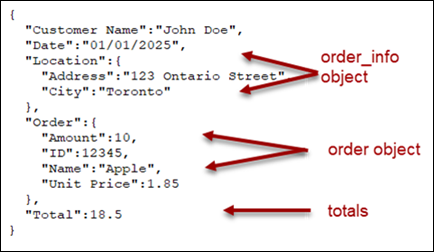
How to Modify the Data
Remove all Location data from order_info.
Example:
order_info'remove("Location")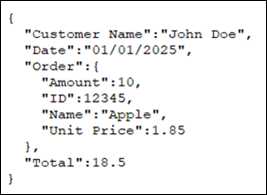
Only remove Location:Address data from order_info.
Example:
order_info'remove("Location.Address")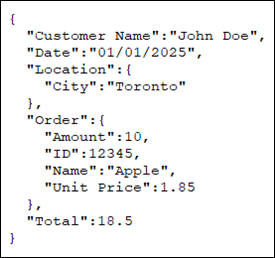
How to Load JSON Files
Using the Load_json_file( ) method, load the file using a full path.
json_obj'load_json_file("<fullpath_tofile.json>")Example:
order_info'load_json_file("orders.json")How to Load JSON Data
How to Load the Data from an Array
These steps show you how to load the data from an array.
1. | Create an associative array. Example: | |
2. | Create an object called json_obj. Example: json_obj=new("*obj/json") | |
3. | Using the Load_array( ) method, load the data from the array. Example: json_obj'load_array(my_array${all}) Using the Print( ) method, you can print the JSON data. Example: json_obj'print() 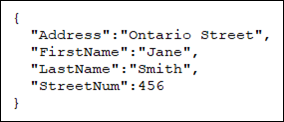 |
How to Load the Data from a String
These steps show you how to load the data from a string.
1. | Set up a string. Example: string$="{Address: ""Ontario"",StreetNum: 456}" | |
2. | Load the data from a string. Example: json_obj'load_string(string$) | |
3. | Using the Print( ) method, you can print the JSON data. Example: json_obj'print() 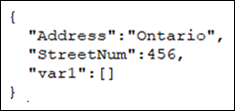 |
How to Work with a List
These steps show you how to work with a list.
1. | Create an object called json_list. Example: json_list=new("*obj/json") | |
2. | Using the Append( ) method, add the key_name with its numeric/string value to the object. If the key already exists, an Error #11 (Record not found or Duplicate key on write) will occur. json_obj'append("key_name","value") Example 1: | |
3. | Using the Append_to( ) method, append a third index to the array. json_list'append_to("3.Location","1","value") Example: json_list'append_to("3.Loc_2","1","Value_3") OR json_list'append_to("3.Key","2","value_2") Example: json_list'append_to("3.Location","2","abc") | |
4. | Using the Print( ) method, you can see the data. Example: json_list'print() | |
5. | Drop the json_obj objects. Example: drop object json_list |
See Also
*OBJ/JSON - JSON Object
*OBJ/XML - XML Object
Associative Arrays (Hash Tables)
DIM Define Arrays and Strings
DIM( ) Generate String/Get Array Size
'JV' JSON Version