Step 2: File Maintenance Object Properties
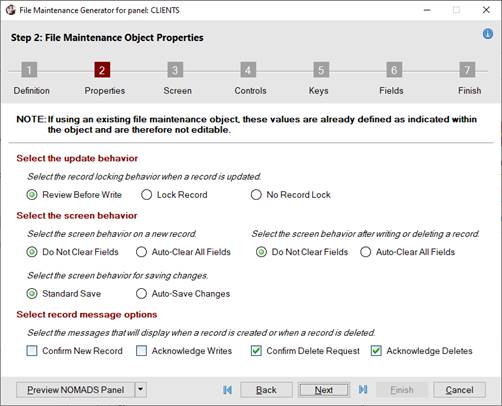
Define the options for record update behavior, screen behavior and record messages.
When only HTML Page is selected as the Form Type in Step 1: Definition, options that are not applicable are not displayed, as shown in the second screen shot:
 |
|
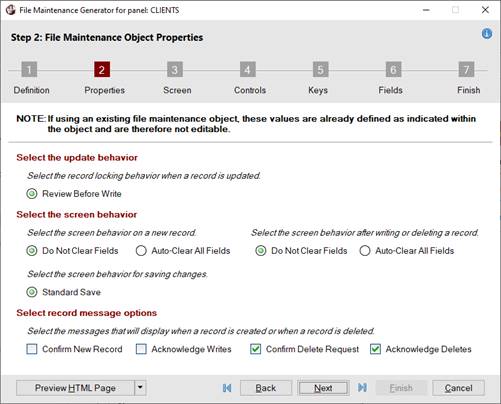
This panel consists of the following:
| Select the update behavior | Select the record locking behavior when a record is updated. |
|---|---|
| Review Before Write | (Default) Record's contents are reviewed before the record is written to determine if another user changed any fields. |
| Lock Record | (Applicable for NOMADS Panels Only) Locks the record. |
| No Record Lock | (Applicable for NOMADS Panels Only) Writes the record with no lock. |
| Select the screen behavior | Select the screen behavior on a new record, for saving changes and after writing or deleting a record. |
| Do Not Clear Fields | (Default) Record's contents are not cleared from data fields. This behavior can be applied after a new record key is entered and after a record is written or deleted. |
| Auto-Clear All Fields | Record's contents are automatically cleared from data fields. This behavior can be applied after a new record key is entered and after a record is written or deleted. |
| Standard Save | (Default) To save a new or edited record, the Write button is selected; otherwise, a confirm-save message displays when tabbing off an input control and selecting the Clear, Exit, browse or X (Close) buttons. |
| Auto-Save Changes | (Applicable for NOMADS Panels Only) A new or edited record is automatically saved when tabbing off an input control and selecting the Exit, browse or X (Close) buttons. No Write button is provided. |
| Select record message options | Select the messages that will display when a record is created or deleted. |
| Confirm New Record | A message asks to create the new record before proceeding. |
| Acknowledge Writes | A message confirms that the new record has been added or an existing record has been updated. |
| Confirm Delete Request | (Default) A message asks to delete the selected record before proceeding. |
| Acknowledge Deletes | (Default) A message confirms that the selected record is deleted. |