Defining a Query
When defining a query, three basic steps are involved:
1. | Define query characteristics. | |
2. | Define query contents. | |
3. | Define criteria for selecting records. |
Access the Query Definition window via Library Object Selection. Click the Query button and enter a query name in the Name field (or vice versa depending on the selected View) to create a new query.
You can also select the Query Definition task on the IDE Main Launcher.
(The Query Definition task on the IDE was added in PxPlus 2023 Update 1.)
Query Type
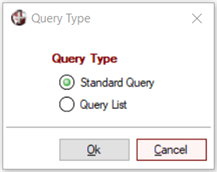
When defining a new query, a prompt displays to select a Query Type, either Standard Query or Query List.
This section provides information on defining a Standard Query:
Creating a new Standard query brings up the Query Header window.
Modifying an existing Standard query proceeds directly to the Query Definition window.
The Query List is intended for use by Smart controls to auto-load a list of records from a data file or database table into a control:
Creating a new Query List brings up the Query Definition - File Information window for defining the Query List header information.
Modifying an existing Query List proceeds directly to the Query List Definition window for defining the Query List contents.
See Smart Controls for information on using, defining and formatting Smart controls.