Substitute Panels
Substitute panels are panels that can be processed instead of the originally specified panel when certain conditions are met. This is useful when, for example, you want unique panel designs based on running iNomads, different screen resolutions, different operating systems, different users, etc. For a particular panel, you can define various conditions, which result in a different panel being processed rather than the one named. Substitute panels can also have different controls and different logic.
When a panel is to be loaded, substitute panel definitions associated with that panel are processed to determine if a substitute panel is to be used instead. This occurs before the original panel's PreLoad logic is to be executed. A substitute panel definition consists of a condition, an associated library and a panel. The conditions specified in the substitute panel definitions are evaluated in order until a condition is evaluated as true. When a condition is true, the new library and panel in the definition are substituted for the original library and panel that was being loaded. This means that the original panel is not loaded. Instead, the panel and library references are changed to the new panel/library, the PreLoad logic for the new panel is executed and the new panel is loaded. If no conditions are true, then the originally specified panel is loaded.
Substitute Panel Maintenance
The Substitute Panel Maintenance utility allows you to specify the conditions to apply when loading the panel currently being defined in the NOMADS Panel Designer, as well as specify the panel/library to substitute when a condition is true.
This utility is invoked by selecting Assign Substitute Panels from the Utilities menu in the NOMADS Panel Designer.
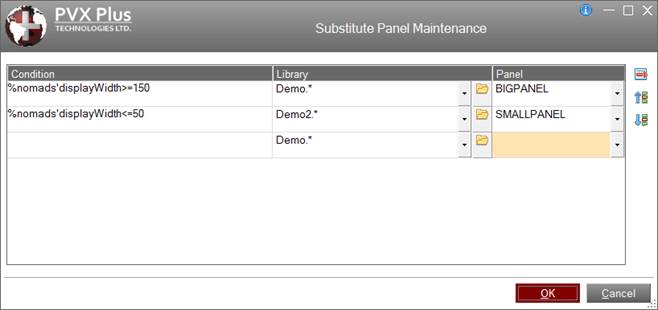
(The Substitute Panel Maintenance utility was added in PxPlus 2016.)
This utility consists of the following:
Condition | Conditional expression that is to be evaluated to determine if a substitute panel will be used instead of the originally specified panel. Conditions are evaluated prior to any logic associated with the original panel. This means that variables used in the conditions must be set up prior to the processing of the original panel. Global variables can be set up in a START_UP program or in application launch programs. System variables and functions can also be used to identify iNomads, operating systems, users, terminal ID's, etc. (i.e. SYS, WHO, FID(0)). In addition, %NOMADS properties such as 'DisplayHeight and 'DisplayWidth can be used. See %NOMADS Properties. The %iNomads>0 condition can be checked to run a different panel when using iNomads. |
Library | Path to the library containing the substitute panel. Click the drop-down arrow to invoke a list of recently used libraries. Click the Browse button to look through the directory structure to find the library or type the library path. An expression can also be entered by preceding the expression with an = (equals sign); e.g. =libname$ or ="mylib.en". If the library does not currently exist, a warning is displayed, but the library is considered valid. (Support for entering an expression for a Library name was added in PxPlus 2019.) |
Panel | Name of the panel that is to be substituted when the associated condition is true. The drop-down list contains all panels in the library. You can also type the panel name. If the panel does not currently exist, a warning is displayed, but the panel is considered valid. |