'ARC' Define/Draw Arc
GUI Display/Printer
Formats
1. | Draw Arc (Starting/Ending Angles) | 'ARC'(x,y,radius,aspect,angle_1,angle_2) |
2. | Draw Arc (Radial Coordinates) | 'ARC'(x,y,radius,aspect,startRadialX,startRadialY,endRadialX,endRadialY) |
Where:
angle_1 | Angle (in degrees) measured counter clockwise from the right-center (3 o'clock) position of the arc circle to the starting point of the arc. Numeric expression. |
angle_2 | Angle (in degrees) measured counter clockwise from the right-center (3 o'clock) position of the arc circle to the ending point of the arc. Numeric expression. |
aspect | Aspect ratio/viewpoint. (Ratio=1 results in no tilt.) Numeric expression. |
startRadialX | Coordinates along a line that extends from the center of the drawing, in graphical units. The point where this line intersects with the arc circle defines the start of the arc. Numeric expression. |
endRadialX | Coordinates along a line that extends from the center of the drawing, in graphical units. The point where this line intersects with the arc circle defines the end of the arc. Numeric expression. |
radius | Radius of the arc circle, in graphical units. Numeric expression. |
x,y | Coordinates for the center of the drawing, in graphical units. Numeric expression. |
(Support for the Radial Coordinates format was added in PxPlus 2020.)
Description
Use 'ARC' to draw (print) an arc on the device. Use graphical units or @X(col) / @Y(line) functions for x,y and radius.
When drawing the arc, it can extend in either of two ways:
From starting angle_1 to ending angle_2 OR
From where the line (defined by startRadialX and startRadialY) intersects with the arc circle to where the line (defined by endRadialX and endRadialY) intersects with the arc circle
The 'ARC' mnemonic uses the current attributes for 'PEN' mnemonic.
For PDFs and Windows graphical drawing, entering a ratio=0 means no ratio. A ratio < 0 is invalid and results in an Error 29: Invalid Mnemonic or position specification.
See Also
@X(col) / @Y(line) Convert X/Y Coordinates
'PEN' Define Pen Style
Example
The examples below draw two different colored arcs. Aspect ratio=3 tilts the resulting drawing into an elliptical "shape". (Since this ellipsis is really two arcs as opposed to an enclosed shape, 'FILL' mnemonic attributes do not apply.)
Aspect ratio=1 joins the arcs in a circular shape instead.
print 'pen'(1,3,1) |  | |
print 'pen'(1,1,12) | 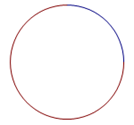 |